Customer
What is a customer
A customer represents an individual or business that you onboard to use your banking products and services. Each customer record in COS stores identity information, compliance status, and relationships to accounts. Classification of a customer record as Personal or Business drives different validation rules and compliance requirements.
A customer record sits within your partner construct and will have a relationship with one or more accounts. Customers belong to your partner, can exist without any accounts, and serve as the identity layer for all banking operations.
Think of your customer as the people or businesses you serve. When John Smith wants to open an account with ACME Fintech, you first create a customer record for them in COS.
You create a customer record using Cross River APIs or COS Explorer as part of your onboarding flow. Each customer record goes through KYC or KYB verification, status tracking, and compliance monitoring throughout their lifecycle.
A customer record is identified by 2 IDs:
- Customer ID: A GUID
- A Customer Information File number (CIF number) auto-generated for regulatory identification and tracking
Role of the customer
1. Legal Identity Record
The Customer establishes legal identity:
- For Personal customers: First name, last name, birth date, SSN/TIN
- For Business customers: Entity name, date formed, EIN, entity type
- CIF Number (Customer Information File): Standard identifier used for regulatory reporting – generated by COS
- Client Identifier: Partner-provided ID to map their internal customer ID to Cross River's system
2. Compliance and Risk Anchor
The customer is the primary compliance checkpoint where Cross River may perform:
- OFAC screening (Office of Foreign Assets Control sanctions screening)
- PEP screening (Politically Exposed Person detection)
- Internal List screening (Cross River's internal watch list)
- Risk Rating (risk assessment classification)
- Due Diligence collection (KYC for Personal, KYB for Business)
These compliance results apply to all accounts associated with the customer, although partners can configure whether customer onboarding scans are enabled (run when the customer record is created). If scans are disabled, the customer is marked as "NotScanned" and picked up by daily Verafin scans. Compliance checks occur during customer creation, before account opening.
Cross River's compliance systems use the customer record to meet regulatory obligations including Bank Secrecy Act (BSA), Anti-Money Laundering (AML), and Know Your Customer (KYC) or Know Your Business (KYB) requirements.
3. Contact Information Hub
Customer maintains contact information through related entities:
- CustomerAddress: Physical, mailing, and business addresses (multiple per customer)
- CustomerPhone: Mobile, home, work, and fax numbers
- CustomerEmail: Email addresses for communication
Each type supports multiple entries with one marked as primary.
Customer hierarchy
The banking hierarchy flows:
Partner → Product → Account
Partner → Customer
Customer + Account
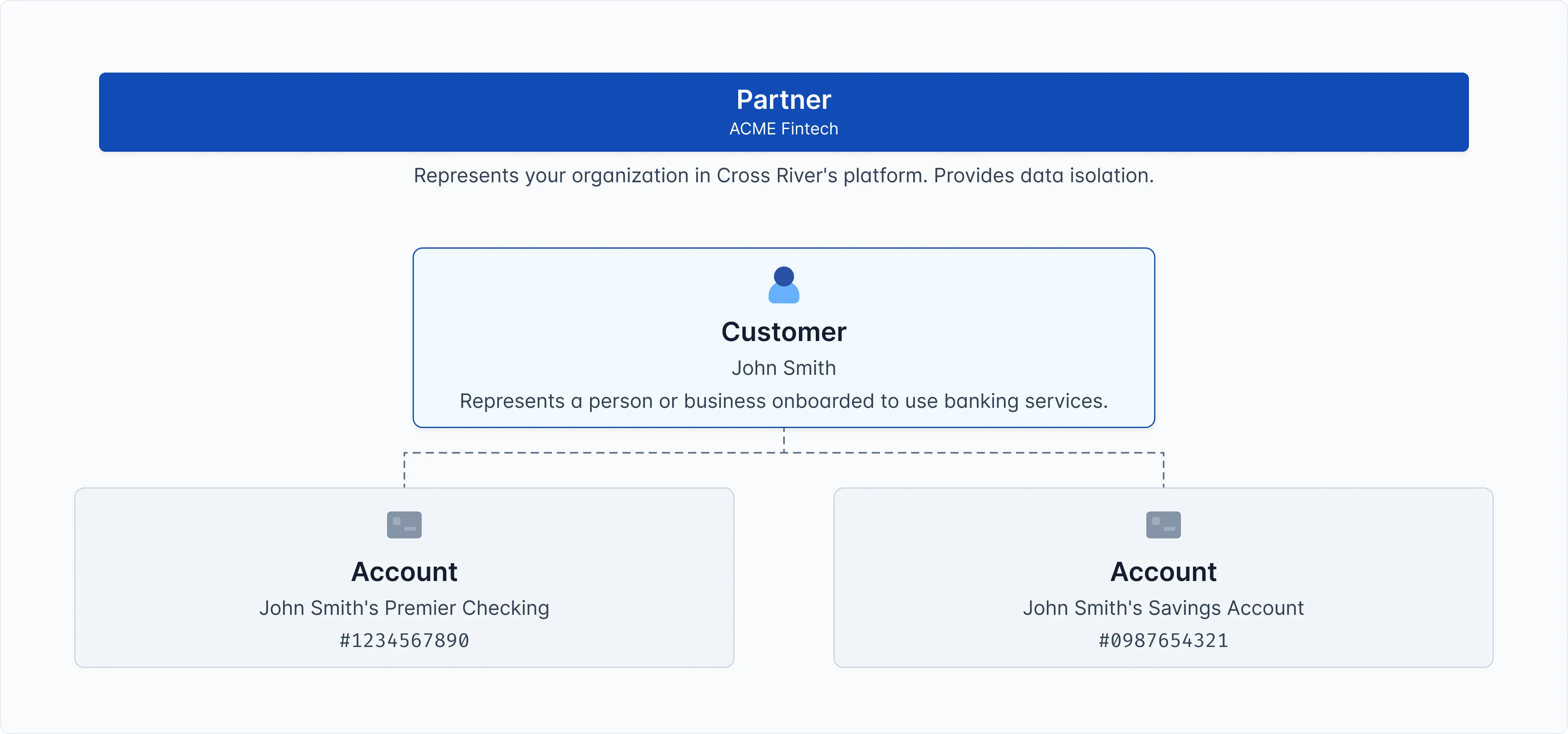
Here's how a customer fits into your partner's structure:
- Partner (you): Your organization in the Cross River system. For example, ACME Fintech
- Product (configuration template): Banking service packages your RM (Relationship Manager) creates for you. For example, Premier Checking.
- Customer (your end user): Individuals or businesses using your platform. For example, John Smith.
- Account (banking account): Individual customer banking accounts. For example, John's checking account #1234567890 and John's saving account #0987654321 (opened under your product)
Notice that John Smith is a single customer record but can be associated with multiple accounts. The customer stores the identity information once, and all accounts reference it.
Key Terms
1. CIF Number (Customer Information File)
- Standard banking identifier for the customer
- Unique across the system
- Used for regulatory reporting and compliance filings
- Persists throughout customer lifecycle
2. Customer Classification
- Categorizes customers as either Personal or Business
- Determines which data fields are required and validated
- Set at customer creation and affects all associated accounts
- Personal customers require different fields than Business customers:
- Personal: BirthDate, Regulation O, PEP screening
- Business: EntityName, DateFormed, OwnershipType, EntityType
3. Compliance Screening
- Automated checks against regulatory lists (OFAC, PEP, Internal List)
- Performed at the customer level
- Results apply to all accounts owned by that customer
Validation Rules
Customer Classification determines which fields are required and allowed:
Personal customers require:
- BirthDate
- Regulation O status
- PEP (Politically Exposed Person) screening
Business customers require:
- EntityName
- DateFormed
- OwnershipType
- EntityType
Validation enforcement: For example, a Business customer cannot have a FirstName field. This will raise an error.
Compliance Workflow
Screening occurs at the customer level, not per account:
- The customer is screened once against compliance lists
- Screening results affect all accounts owned by that customer
- If a customer is flagged, all their accounts are impaced
This approach prevents duplicated screening and ensures consistent compliance enforcement across all customer activities.
Relationship to other entities
Partner → Customer
- Customer record belongs to exactly one Partner (via PartnerId)
- Customer records cannot be transferred between partners
- Partners can only access their own customers (strict data isolation)
Customer → Accounts
- Customer can have a relationship with multiple accounts (one-to-many relationship) – see Accounts page for more information.
- Account references CustomerId to establish ownership
- Relationship defines the role: Primary, Signer, Authorized User, etc.
- One Account can have relationships with many Customers (joint accounts)
- Customer must be Active to open new accounts
- Every Account must have at least one Customer relationship (typically Primary)
- Customer records cannot be deleted once they have been associated to an account
Related concepts
- Partner
- Product
- Account