Account
What is an account
An account is a banking account record structured according to a product template. Each account inherits its foundational configuration, currency, account type, and classification, from its product at creation, then enables per-account customization of credit limits, interest rates, and statement preferences.
Every account is identified by an AccountNumber and is associated with one product (template), and one partner.
Accounts inherit foundational configuration from their product at creation (such as AccountType, currency, and classification) but support per-account customization (such as credit limits, rate cards, and statement preferences).
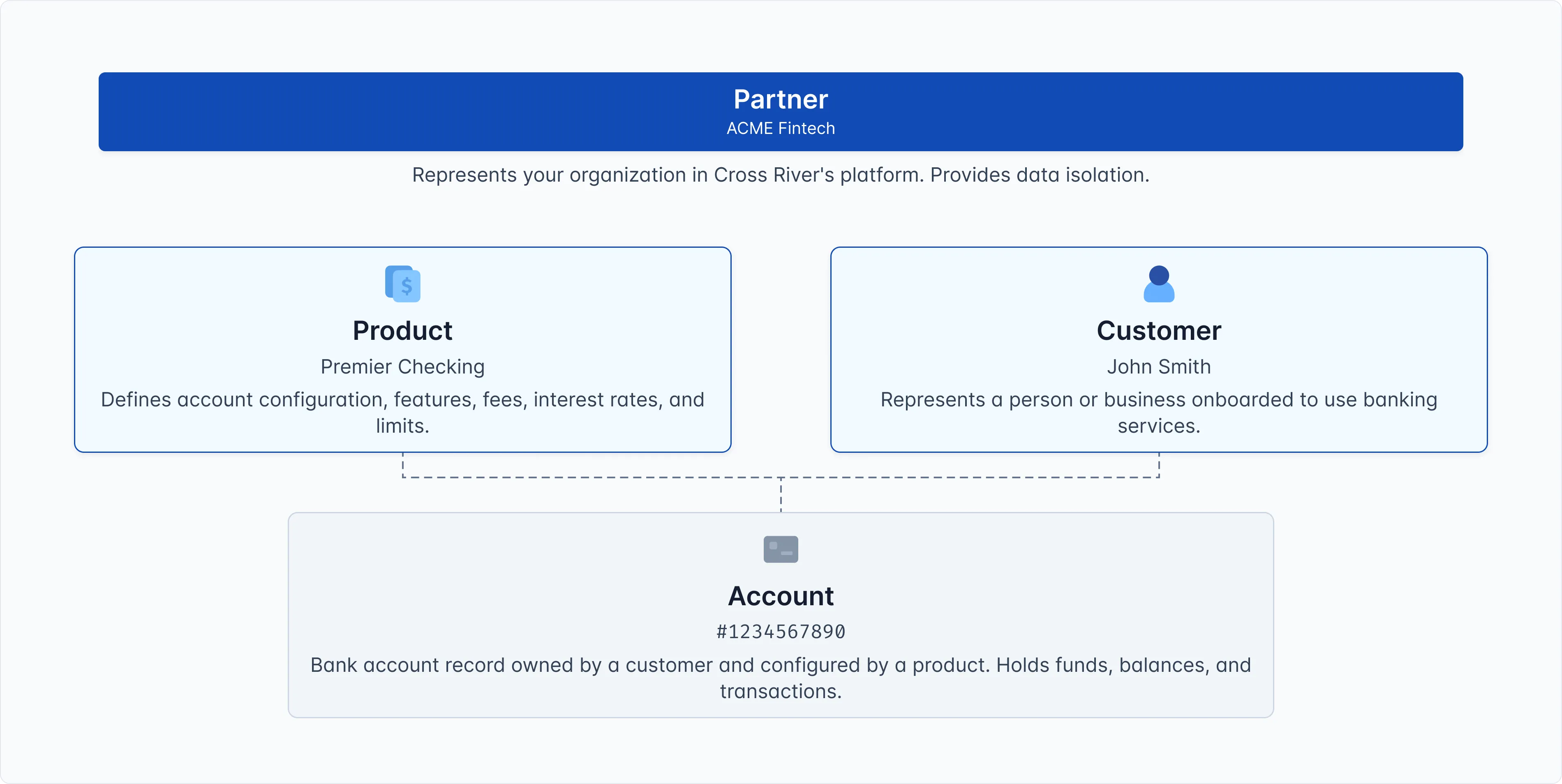
For example, when ACME Fintech creates an account for John Smith based on the Premier Checking product, this results in an account in COS that links the customer (John Smith) to the product (Premier Checking).
Accounts sit at the bottom of the COS hierarchy. To create an account, you must already have both a customer and a product. Depending on your operational model and your agreement with Cross River, you might not be able to create accounts. Refer to our accounts concept pages to learn about different types of accounts.
Account number: Each account has a unique account number that identifies it externally for payment routing purposes (for example for sending an ACH or wires). The account number is what customers and external systems use to send and receive payments.
Role of the account
Accounts are created using Cross River APIs or COS Explorer after a customer has been onboarded and KYC or KYB verified. Each account links a customer to a product, both of which must belong to the same partner.
An account is:
- A bank account: Where money is held and transactions occur
- Customer-owned: Belongs to a specific customer
- Product-defined: Follows rules from its product
- Identified by an account ID: Also known as an account number
Account hierarchy
Here's how an account connects everything:
- Partner: ACME Fintech (your organization)
- Product: Premier Checking (defines account behavior)
- Customer: John Smith (owns the account)
- Account: John Smith's premier checking #1234567890
Notice that the account requires three things: a partner, a product, and a customer. All three must belong to the same partner for the account to exist.
Key concepts
Configuration Inheritance vs Override
- Inherited from Product (immutable): AccountType, ProductType, Currency
- Can be overridden (mutable): Credit limits, rate cards, overdraft settings, statement preferences
- Product changes do NOT cascade to existing Accounts (configuration snapshot model)
Account as the bottom of the hierarchy: Accounts sit at the bottom of the COS entity hierarchy. They require both a customer and a product from the same partner to exist. Accounts cannot exist independently. They need the identity layer (customer) and the configuration layer (product) to function.
Relationship to other entities
Product → Account
- Product is the template; Account is the instance
- Account copies configuration from Product at creation (snapshot, not reference)
- Multiple Accounts can be created from one Product
Customer → Account
- Customer is associated with the Account (one-to-many relationship)
- One Customer may be associated with multiple Accounts (checking, savings, business accounts)
- Customer's compliance status (OFAC, PEP) affects all their Accounts
- An account can also have many customers associated with it. For example, a business account will have a business itself, and then several individuals as auth signers. Some personal accounts with have two individuals because of joint accounts. You may also have beneficiary, because that is a type of relationship to an account which is called ‘payable on death’.
Partner → Account
- Account belongs to exactly one Partner (via PartnerId)
- PartnerId is inherited from the Product at creation
- All Accounts owned by a Customer belong to the same Partner
Additional information
- Partner
- Product
- Customer