Check rail
Transfer funds by check
To pay down loan proceeds, you can transfer funds by sending a physical check to the borrower or a biller (merchant or business). This is useful when you have to pay billers that do not accept payments via Mastercard RPPS.
You can add an optional Base64 encoded attachment to accompany the check, and it will be mailed as a PDF.
Check delivery
After a check is issued, it takes about 5 - 7 business days for receipt (Cross River uses USPS first class mail). If a check is not cashed after 15 calendar days, it is canceled. The delivery method and expiration period can be configured differently for your needs.
You can call the Return rails API to stop payment on a check and log on to the Lending Web Application (from a whitelisted IP) for any information regarding the check.
Webhooks are reported when a check is processed, mailed, tracking information is added, check is cashed, or it expires. For more information on webhooks, view webhook events available.
IMPORTANT When you add a date field in a request, the format must be: yyyy-mm-dd, such as 1970-12-05.
Request parameters
{
{
  "FundingInfoUpdate": {
   "Rails": [
         {
    "CheckFields": {
          "PhysicalAddressOfRecipient": {
            "Line_1": "Anita Loan",
            "Line_2": "Strawberry Fields Lane",
            "City": "Paradise City",
            "State": "NY",
            "Zip": "11252",
            "Country": "USA"
          },
          "Name": "Anita",
          "Attachment": "{Encoded64 text here}",
          "Description": "Loan from Cross River",
          "Remittance_advice": "",
          "IsPrintedandMailed": "0",
          "CheckEmail": "[email protected]"
        },
"RailType":"CHECK",
"Priority":1,
"Amount":200.0
}
    ]
  }
},
Request parameters
Attribute | Description |
|---|---|
Rails array | Rail selected, in this case Check |
Line_1 string | Check delivery address, line 1. 60 character limit if line_2 is provided. 120 characters max length, if line_2 is not provided. Required |
Line_2 string | Check delivery address, line 2. 60 character limit. Optional |
City string | City of business for check delivery. Required |
State string | State of business for check delivery. 2 letters. Required |
Zip string | ZIP code of business for check delivery. Required |
Country string | Recipient's country. Always US. 2-letter country code. Optional |
Name string | Name of the borrower 48 character limit Required |
Description string | The name of the loan being paid. This is printed on the check and looks best if under 100 chars. Optional |
Attachment string | Base64 encoded (see below 1 page PDF). It must be encoded and inserted here as text. Optional |
Remittance_advice array | Base64 encoded text. Up to 700 chars before encoding. Appears on the top third of the page. The check is located on the bottom third of the page. Line breaks and special characters are allowed. Optional |
IsPrintedandMailed boolean | Whether the check is being printed and mailed. True if check is being printed and mailed, otherwise, false. Required |
CheckEmail string | Recipient's email. Optional |
Priority integer | Rail priority Required |
Amount integer | Amount being funded. Required |
Attachments
If your team utilizes our inserts with checks feature, please make sure you follow the requirements listed below (see Attachment attribute). Inserts must be in PDF format.
These are the requirements for creating your PDF:
- TrueType fonts must be used.
- 8.5 x 11 margins are required. Any margins that are smaller or larger than this will not run properly through our programs.
- PDF must be created by Adobe Version 1.4 or better.
- PDF must be in portrait orientation. Inserts oriented in landscape may not print correctly.
- All security on PDF must be removed. PDF can not have edit restriction locks and can not be password protected.
- PDF must be able to display the full page on “actual size” print settings. If an insert is too large to print on the “actual size” setting, the insert will not print properly and the page may be cut off.
- The insert must have all settings embedded/flattened. Fillable form PDF’s that are not embedded cannot be processed correctly and will be rendered blank.
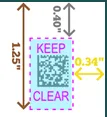
- The blue shaded area shown below should be kept clear. This area is where 2D barcodes are placed.
Postage Fees
Listed fees are postal rates; the bank may add a surcharge.
Postage Method | Fee |
|---|---|
USPS First Class - US | $0.78 |
FedEx Express 2 Day | $14.86 |
USPS Certified Mail | $10.54 |
FedEx Express Overnight | $30.00 |
FedEx Priority Overnight | $40.00 |
USPS Overnight | $45.49 |
USPS Priority "2 day" (delivery confirmation) | $18.82 |
USPS Priority "2 day" (signature required) | $21.32 |